AIRBNB LUXE
Creative brief
A Luxe stay enhances the guest experience through elevated design, premium furniture, exceptional amenities, and functionality across the entire listing. Photography of these homes should reflect the exceptional quality of the space itself.
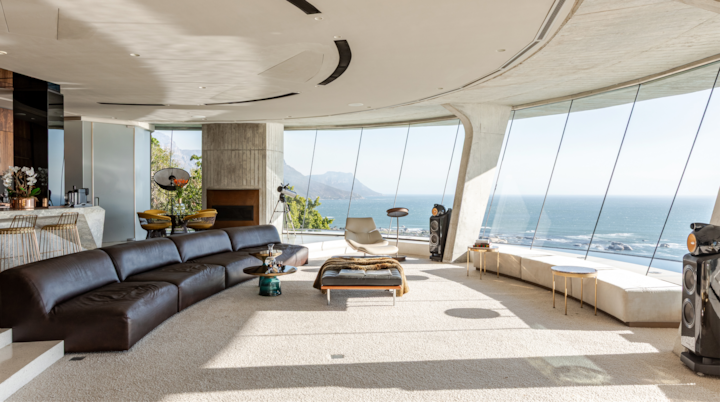
PART 1
Overview
The ‘Cover’
The cover photo is the very first image guests see when browsing Airbnb. On the search page, the photo will appear as a cropped square, while on the actual listing it will be displayed in a wide 16:9 horizontal format. This means the cover photo needs to look great in both layouts.

Exteriors
Compose exteriors wide enough to allow for breathing room around the home in the landscape. We need ample negative space so that we can be flexible when cropping, especially for the 1:1 cover photo (as seen above).

Time of Day
Optimize the timing for the best ambient light, where the structure appears most clear in its environment, rather than obstructed by shadows. The light on the structure should be diffused rather than harsh. If you arrive at high noon, start with interiors first.


PART 2
Art Direction
Overview
The Airbnb photography style encompasses four distinct areas of focus.
1 of 1 pages


Natural light
Pay attention to lighting conditions, both natural and artificial, and adjust your camera settings accordingly. Be mindful of shadows and highlights that can impact the visibility of details. Bracket images with high contrast lighting (such as with windows or direct light). This provides editors with a wider range of information to work with in difficult lighting situations.
1 of 1 pages


Angles
Capturing a diverse selection of angles can help to highlight the space in a way that’s easy to understand.
1 of 1 pages


Details
Use a vertical frame when height or a single feature tells the story—tall windows, layered textures, or a cozy corner. Portrait orientation highlights scale, isolates key details, and gives a warm, editorial feel.
1 of 1 pages


Drone
Certain assignments require drone photography to achieve wider and higher vantage points—this will be clearly indicated in your assignment details. Your primary focus should be on showcasing the property’s exterior, followed by the surrounding area to provide valuable context and visual appeal. Always leave negative space for the square crop. Make sure you check with local authorities and research local drone related laws and obtain all necessary license/permits before accepting an assignment.
1 of 1 pages


PART 3
Coverage
Our shotlist is dynamic and based on listing size. You will see minimum counts on the assignment page, but we encourage going above minimums. The following examples illustrate quality coverage that goes beyond the minimums
Main areas
BedroomsKitchenLivingroomExteriors
Per room
3-4 straight-on1-2 Angle1-2 Vertical
1 of 1 pages


1 of 1 pages


Outdoor spaces
Pools and SpasSports courtsBarBBQOutdoor furnitureFirepitEtc.
Per feature
3-4 images
1 of 1 pages


Entry spaces
ParkingLobbySteps/stairsGatesElevatorsetc.
Varies
(Based on listing entrance)3-10 images
1 of 1 pages


Included amenities
Highlight amenities only if offered as part of the listing. Tip: A mid focal length vertical is good for capturing amenities in smaller spaces (such as bathrooms), while a wide focal length horizontal can be better in large spaces (such as sports courts).


Accessible features
Our goal is to provide all potential guests, including disabled travelers, with images that help provide detailed and reliable information about the space. This means, including steps, stairs, entrances, and unobstructed views of the floor so it’s easy for Guests to decide if the space is right for them.


PART 3
Tech Specs
Equipment
Required equipment
- Clean camera with full frame sensor*
- Zoom lens between 16-20mm
- Tripod (ideally with level)
- Lens hood
- Bracket Merging Software**
- Lens between 20-50mm
- Grey Card
- Door stopper (for fire-doors etc.)
- Lens wider than 16mm
- Fisheye or prime lens
- Flash or strobes
- Photometrix Software (for file conversion / bracket merging)


File settings
Keep in mind that we only need the final merged images in your submission, not single bracketed assets. After merging, we ask you to upload RAW files converted to DNG. RAW file types contain the most information, which allows for more flexibility in retouching. DNGs also upload faster.
In-camera
- RAWs only
- Must be bracketed
- Adobe RGB Colorspace
For upload
- Merged brackets (Explore guide)
- DNGs (converted from .ARW, .NEF, .CR2/3, or .RAF)
Unacceptable formats
- JPGs
- TIFs
- PSDs
- PNGs
- DNGs converted from any of these formats.
Important settings
Images should be bracketed when an interior has a considerable difference between inside and outside exposures. Please merge your bracketed images before uploading. Keep in mind that we only need the final merged images in your submission, not single bracketed assets. We encourage using Adobe Photoshop Lightroom software for merging HDR images and converting files to DNG format to prevent compatibility issues in post-production. Adobe’s features help maintain colour profiles, metadata, and visual quality, providing more flexibility for achieving professional results, regardless of the camera model used. We recommend Camera RAW version 12 or above while exporting DNGs in Adobe Photoshop Lightroom Software. For file conversion and bracket merging, we kindly ask that you refrain from using Photometrix Software.
1 of 1 pages


File naming
Export as DNGs using the following file naming:
- ListingID_Market_ShootDate(YYMMDD).DNG
- Example: 123456_Paris_231025.DNG

More resources
Explore our briefs for our other programs.


The content of this page is proprietary and confidential information of Airbnb and shall not be used, disclosed or reproduced, in whole or in part, for any purpose without the prior written consent of Airbnb.Questions?
photography@airbnb.com