PRO PHOTO PROGRAM
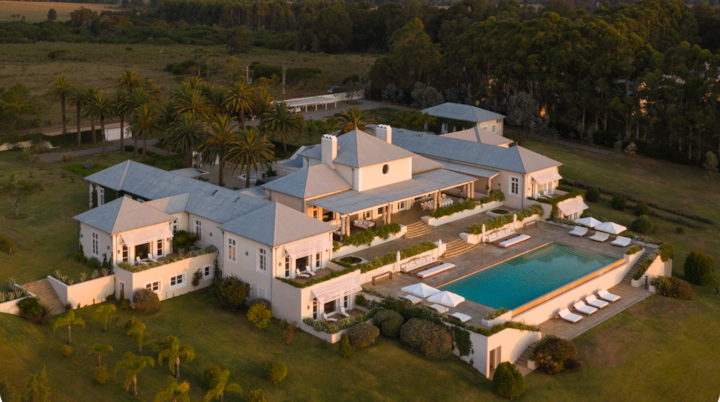
Capturing drone imagery
This guide outlines best practices for capturing clear, compelling drone imagery that showcases homes/hotels, their surroundings, and key amenities.
Preparation


Deliverables
The final deliverables will vary based on the offerings available at the home/hotel. The image count below is per space offered.
Straight-on | Angle | Total | |
|---|---|---|---|
Exterior faćade | 6-9 | 3-4 | 9-13 |
Amenities | 3-4 | 3-4 | 6-8 |
Location | 3-4 | 2-3 | 5-7 |
Estate | 3-4 | 3-4 | 6-8 |
Total | 25 min. |
Time of day
Choose timing that delivers soft, even light and minimizes harsh shadows. Prioritize golden hour and twilight whenever possible.


Negative space
Compose exteriors wide enough to include breathing room around the home. Extra negative space allows flexibility for cropping and layout. Be creative with distance and altitude to fit the full exterior cleanly in frame.

Vantage point
Select angles that highlight the property’s architecture and surrounding geography. Always leave room for a square (1:1) crop.


Variety
Capture a range of compositions to communicate scale, layout, and experience.


Location
Adapt your approach based on the home’s/hotel’s setting to best tell its story.


Drone approvals
Be sure you check with local authorities and research local drone related laws and obtain all necessary license/permits before accepting an assignment.
Drone approvals
Be sure you check with local authorities and research local drone related laws and obtain all necessary license/permits before accepting an assignment.
File settings
In-camera/Upload
- DNGs (native drone RAW format)
- Adobe sRGB Colorspace
Additional tips
- Bracketing (when in high contrast light)
- ND filters (for exposure control)
Unacceptable formats
- JPGs
- TIFs
- PSDs
- PNGs
- DNGs converted from any of these formats.
File naming
Convert your RAW files to DNG, this format preserves the most data for retouching and uploads more efficiently. Export DNGs using the following file naming:
- ListingID_Market_ShootDate(YYMMDD) Example: 123456_Paris_261025.DNG

What to avoid


Strong examples


The content of this page is proprietary and confidential information of Airbnb and shall not be used, disclosed or reproduced, in whole or in part, for any purpose without the prior written consent of Airbnb.Questions?
photography@airbnb.com